
The Ultimate AI Logo Design Prompt Guide: Create Professional Logos with AI
Artificial intelligence has changed how we think about branding. In the past, getting a professional logo meant spending weeks working with a designer or settling for a generic template. Today, you can use an ai logo maker to generate high-quality designs in seconds. However, there is a catch. The quality of your logo depends heavily on the instructions you give the AI.
How do you write a prompt that gets the perfect result? Many users feel frustrated when the AI produces something that looks messy or "off." This happens because AI tools need specific, clear, and descriptive language to understand your vision. Mastering prompt engineering allows you to create professional logos. These logos will look as if they came from a top-tier design agency.
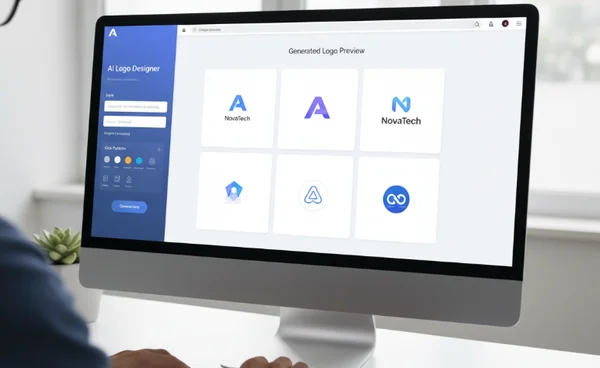
This guide will teach you everything you need to know about writing effective prompts. Whether you are a tech founder or a small business owner, these techniques will help you unlock the full power of AI.
Mastering the Basics of AI Logo Design Prompts
Before diving into complex formulas, you must understand how an AI "thinks." When you type words into an ai logo design tool, the system looks for patterns. It connects your words to millions of existing design concepts. If your prompt is too vague, the AI has to guess what you want. Usually, it guesses something very generic.
Understanding Core Design Elements in Prompts
To get a great result, you need to speak the language of design. You don't need a degree, but you should know a few key terms. When writing your prompt, think about these four elements:
- The Subject: What is the main icon or shape? (e.g., a mountain, a lightning bolt, an abstract circle).
- The Style: Is it modern, retro, hand-drawn, or futuristic?
- The Color Palette: Don't just say "blue." Say "navy blue and silver" or "vibrant neon gradient."
- The Mood: Should the logo feel "trustworthy," "playful," or "aggressive"?
By including these elements, you provide a roadmap for the AI logo design tool to follow. Instead of a random image, you get a targeted brand asset that fits your unique vision.
Simple Structure for Effective Logo Prompts
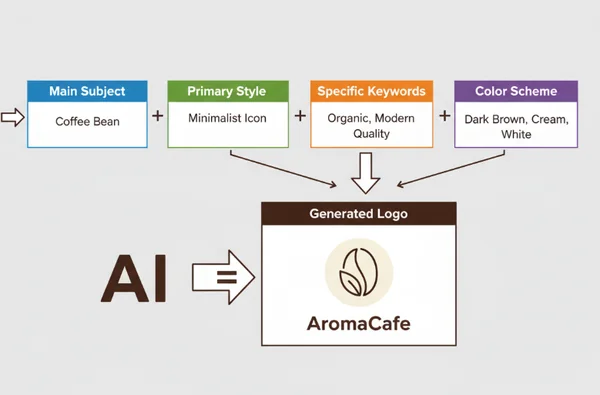
The most successful prompts follow a consistent structure. If you are new to using an ai logo generator, try this simple formula:
[Main Subject] + [Primary Style] + [Specific Keywords] + [Color Scheme]
For example, if you are opening a coffee shop, a bad prompt would be: "a logo for a coffee shop." A great prompt would be: "Minimalist coffee bean icon, clean line art style, elegant, professional, dark brown and cream colors." This structure gives the AI enough detail to be creative without getting lost. It ensures the output aligns with your business goals from the very first click.
Advanced Prompt Engineering Techniques for Better Design
Once you are comfortable with the basics, you can start using advanced techniques. These methods help you fine-tune the output. They allow you to create something truly unique that stands out from the competition. Using an online logo maker becomes much more powerful when you know how to manipulate these variables.
Combining Multiple Design Styles in One Prompt
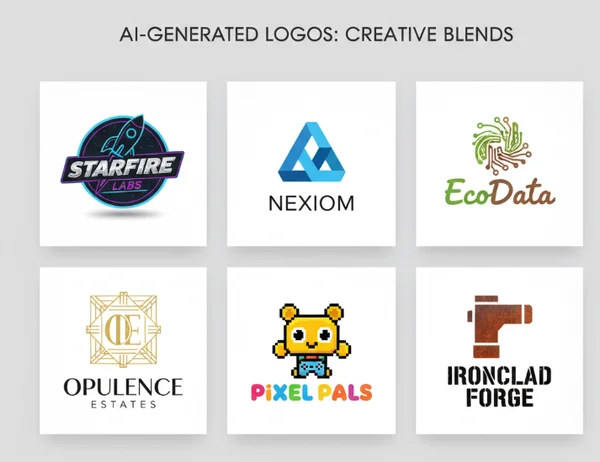
One of the best ways to create a "one-of-a-kind" look is to blend styles. AI is excellent at finding the middle ground between two different concepts. For instance, you could try "Retro-Futurism." This combines the nostalgia of the 1980s with modern, sleek lines.
Try prompts like "Geometric fox head, Bauhaus style mixed with Japanese minimalism, flat design." This creates a sophisticated look that is hard to achieve with standard templates. It shows the AI that you want a specific artistic direction, not just a generic clip-art icon.
Using Negative Prompts to Exclude Elements
Sometimes, knowing what you want to exclude matters just as much as knowing what to include. While not all tools have a dedicated "negative prompt" box, you can still include exclusions in your main prompt. If you want a clean look, use phrases like "no gradients," "no shadows," or "no complex details."
Using an ai logo designer effectively often means stripping away the "noise." If the AI keeps adding 3D effects when you want a flat logo, explicitly state "2D flat vector style, no 3D render." This forces the AI to focus on the core shapes and colors that matter to your brand identity.
Industry-Specific Prompt Formulas
Different industries have different visual "codes." A law firm should not look like a toy store. You can improve your results by using industry-specific keywords that the AI recognizes as high-quality for that sector.
- For Luxury Brands: Use words like "Gold leaf," "Serif typography," "Minimalist," and "Sophisticated."
- For Organic/Natural Brands: Use "Hand-drawn," "Earth tones," "Floral motifs," and "Soft edges."
- For High-Tech Brands: Use "Circuit patterns," "Neon gradients," "Cybernetic," and "Symmetric."
Applying these formulas helps the AI understand the context of your business. This is why many entrepreneurs generate a logo using specific industry descriptors to ensure the vibe is exactly right.
Industry-Specific Prompt Examples
To help you get started, let’s look at some "ready-to-use" prompts for common business types. You can copy these into our tool and see the magic happen instantly.
Tech Startup Prompts for Modern Minimalism
Tech companies usually need to look innovative and fast. Modern minimalism is the standard here.
- Prompt 1: "Abstract lightning bolt forming a 'Z' shape, tech-focused, blue and white gradient, sleek, flat vector design."
- Prompt 2: "Minimalist geometric circuit node, futuristic, dark mode aesthetic, cyan and slate grey, professional."
- Prompt 3: "SaaS brand icon, cloud and data link symbol, simple bold lines, high-contrast, emerald green."
Creative Business Prompts for Artistic Styles
If you are a photographer, writer, or designer, your logo should show off your creativity.
- Prompt 1: "Hand-drawn paintbrush stroke in a circle, watercolor texture, artistic, soft pink and gold, elegant."
- Prompt 2: "Vintage typewriter key icon, retro aesthetic, black and white, woodcut style, highly detailed."
- Prompt 3: "Boho-style sun and moon illustration, fine line art, whimsical, terracotta and navy colors."
E-commerce Prompts for Conversion-Focused Designs
E-commerce logos need to be legible even at very small sizes, like on a mobile screen or a shipping label.
- Prompt 1: "Bold shopping bag icon with a smiling face, playful, bright orange and white, thick lines, easy to read."
- Prompt 2: "Modern lettermark 'M' for a fashion brand, luxury, black on white, high fashion aesthetic, clean."
- Prompt 3: "Speedy delivery box icon with motion lines, energetic, red and yellow, flat design, commercial style."
Troubleshooting Common Prompt Issues
Even with a great prompt, the AI might not get it right on the first try. Design is an iterative process. If you don't like what you see, don't give up. You just need to tweak your input.
Fixing Overly Generic Logo Results
If your logo looks like thousands of others, your prompt is likely too broad. Words like "cool," "good," or "business" don't mean anything to an AI. To fix this, add sensory adjectives. Instead of "a mountain logo," try "a jagged, snow-capped mountain peak with a sun rising behind it, minimalist stencil style." The more specific you are about the visual details, the less generic the result will be.
Achieving Better Brand Alignment in AI Designs
Sometimes the logo is beautiful, but it doesn't "fit" your brand. This usually happens because the mood is wrong. If your brand is supposed to be serious but the AI gives you something "bubbly," check your adjectives. Focus on "authoritative," "sturdy," or "traditional."
You can also use the color selection feature on our logo design tool to lock in your brand colors before you even hit generate. This ensures that the AI stays within your brand's visual identity.
Refining Prompts for Professional Quality
If the logo looks a bit "messy" or "amateur," it’s often because the AI tried to do too much. Less is more. Try removing one or two keywords to simplify the design. Professional logos are usually simple. Look at Nike or Apple; they are just one shape. Use prompts like "extremely simple," "iconic," or "symbolic" to move away from complex illustrations and toward professional branding.
Your Journey to Logo Prompt Mastery
Mastering the art of AI-powered logo design empowers you to create professional branding quickly and affordably. Understanding how to structure prompts and using specific design keywords helps you create a brand identity. This identity will genuinely resonate with your audience. Remember that the best results come from a mix of clear subjects, defined styles, and a touch of creative experimentation.
The most important takeaway is to be specific. Don't just ask for a logo; describe a vision. Use the formulas we've discussed to guide the AI toward the professional quality your business deserves.
Ready to put these tips into action? You can try AiLogoDesign.net right now. Simply enter your brand name, pick a style, and use your new prompt skills to generate dozens of unique options in minutes. Your perfect logo is only a few words away!
The Takeaway
How long should my AI logo prompt be for best results?
Most experts find that a prompt between 10 and 20 words is the "sweet spot." If it is too short (under 5 words), the AI lacks direction. If it is too long (over 40 words), the AI can get confused and start blending elements in strange ways. Focus on high-impact adjectives and clear nouns.
Can I trademark logos created with AI prompts?
Trademark laws vary by country, but generally, you can apply for a trademark on an AI-generated logo if it is unique and used in commerce. However, because AI uses existing patterns, it is always a good idea to perform a trademark search first to ensure your design doesn't accidentally resemble an existing brand too closely. You can start your design and then consult a legal expert for peace of mind.
What's the most important element to include in a logo prompt?
The Style is usually the most important element. While the subject (like a "lion") tells the AI what to draw, the style (like "minimalist line art") tells the AI how to draw it. The style determines if the logo looks professional or like a cartoon.
How many prompts should I try before settling on a design?
Expect to try at least 3 to 5 variations of your prompt. Each time you generate, you will see things you like and things you don't. Use those insights to refine your next prompt. Most successful users on our platform find their perfect design within their first 10 generations.
Can I use competitor names in my prompts for inspiration?
Yes, you can use phrases like "in the style of [Famous Brand]" to give the AI a reference point for the quality or vibe you want. However, avoid trying to copy them exactly. Use it as a stylistic guide to ensure your logo feels as premium as the leaders in your industry.